
Offer Overview
The Offer Overview in Surface Solutions provides central management of all created offers. It allows you to quickly review the status, details, and next steps for each offer.
You can access the Offer Overview via the "Offers" item in your navigation bar.

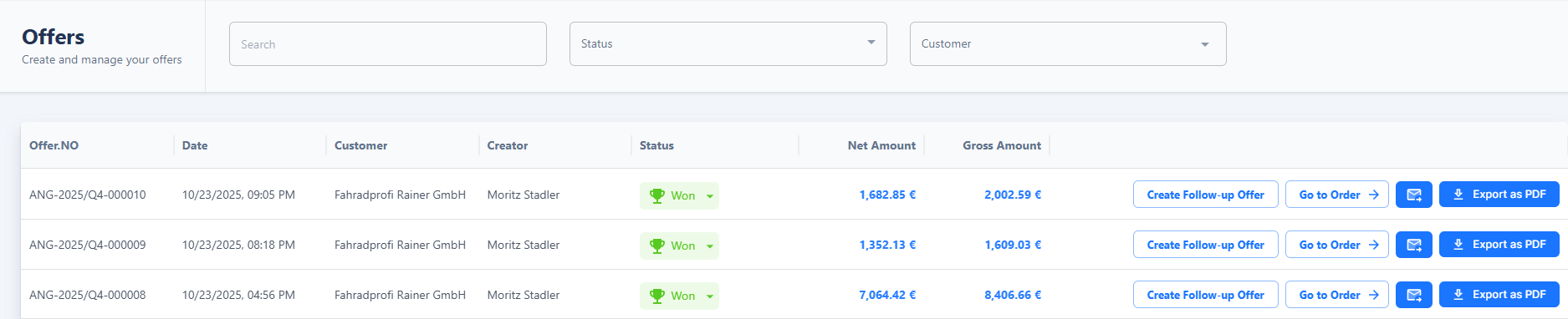
Overview and Filters
In the overview table, you can see the following information for each offer:
-
Offer number
-
Creation date
-
Customer
-
Creator
-
Status
-
Net and gross amount
You can filter offers by status and customer or use the free-text search to find specific offers. Filtering is dynamic, and the overview is updated accordingly.
Actions for Offers
The following actions are available for each offer:
-
Create Follow-Up Offer: The offer is copied, allowing minor adjustments without creating a new calculation. For more complex changes, duplicating the calculation is recommended.
-
Send Offer via Email or Export as PDF: Data is automatically adopted from the customer database, the calculation, and the document definition.
Status "Won" and Order Creation
The status field is particularly important:
When you set the status of an offer to Won, the "Generate Order" button appears automatically. Clicking this button creates an order based on the offer, adopting all positions, prices, and information.
