Document definition
- Overview
- Document Definition for Invoices & Credit Notes
- Document Definition for Offers
- Document Definition for Purchase Orders
- Document Definition for Emails
Overview
Through the document definition in Surface Solutions, you can control the contents of all automatically generated documents within your organization.
Here you define how invoices, offers, orders, and emails look, which information is included by default, and how number ranges or tax rates are assigned.
This ensures that all documents – regardless of which user creates them – are generated consistently, correctly, and in the desired corporate design.
With the document definition, you can:
-
Centrally define your organization’s logo, PDF background, and contact information.
-
Define number ranges for different document types (invoices, credit notes, offers, orders).
-
Manage tax rates and VAT notes.
-
Configure standard positions for offers to automatically print surcharges or overarching costs.
-
Manage text elements such as payment terms, delivery terms, footers, and general notes.
-
Store standard texts and attachments for emails, including CC recipients and signatures.
The document definition is modular and divided into several sections:
- Document Definition for Invoices and Credit Notes
Here you define all contents, layouts, and logics that apply to invoices, cancellation invoices, and credit notes.
In addition to general information such as logo and background, you can configure tax rates, number ranges, and legal notices. - Document Definition for offers
In this section, you define which information and layouts are used for offers.
A central element is the standard positions, which allow you to automatically print additional surcharges or summary values such as material costs, setup costs, or color changes. - Document Definition for Orders
Here the standard information for orders is maintained – such as sender, billing, and delivery addresses, delivery terms, and general notes.
Additionally, you can individually define the number range for orders. - Document Definition for Emails
In this section, you control the standard texts and attachments for emails used when sending documents.
You can define subject, message, CC recipients, and standard attachments per document type. Additionally, a personal email signature can be set for each user.
By combining these four sections, the document definition provides a comprehensive solution to standardize all business documents in Surface Solutions in terms of content, visuals, and structure.
This gives you full control over the appearance of your documents while ensuring consistent processes and legal compliance across the organization.
Document Definition for Invoices & Credit Notes
In the document definition, you determine how all documents generated by Surface Solutions appear and which standard information they contain. This applies to invoices, cancellation invoices, credit notes, purchase orders, and emails. Through the document definition, you can define the content, layout, logo, and background for PDFs.
Invoice
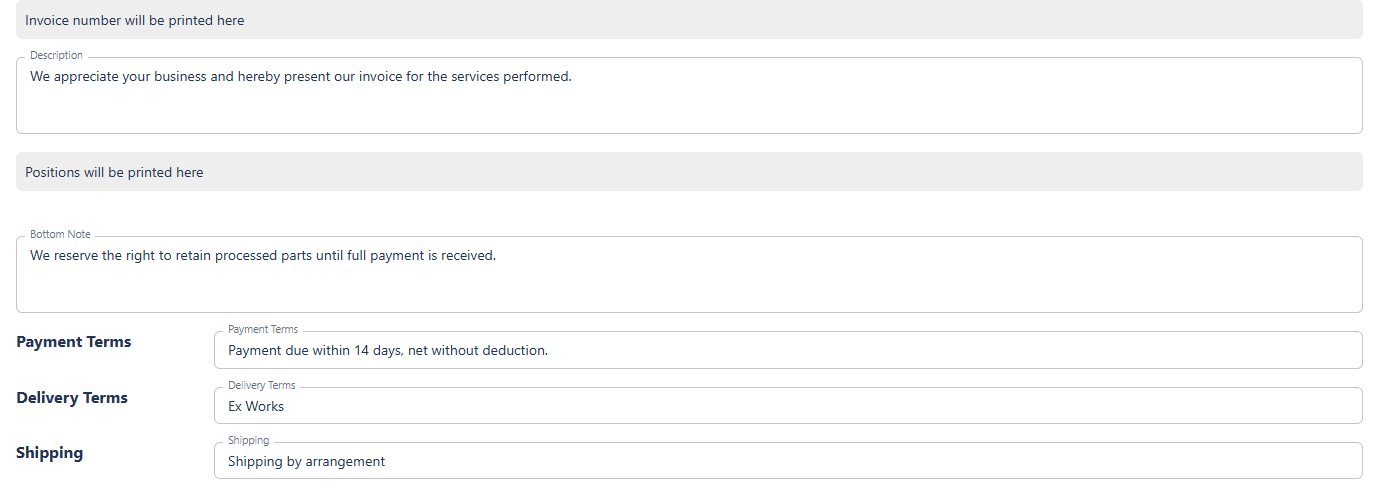
Under the “Invoice” tab, you can edit all information relevant to invoices. The settings you make here also apply to cancellation invoices and credit notes. These include:
-
Logo and Background: You can define a separate logo and background for each type of document.
-
Standard Information: This includes the organization’s contact details, standard texts, notes, payment terms, footer, SEPA information, and QR code. These default values are automatically applied to all created invoices, but can be overridden for individual invoices if necessary.
-
Positions: Standard positions can be automatically added from the document definition. They can be edited or deleted in the invoice editor if needed.
Tax Rates
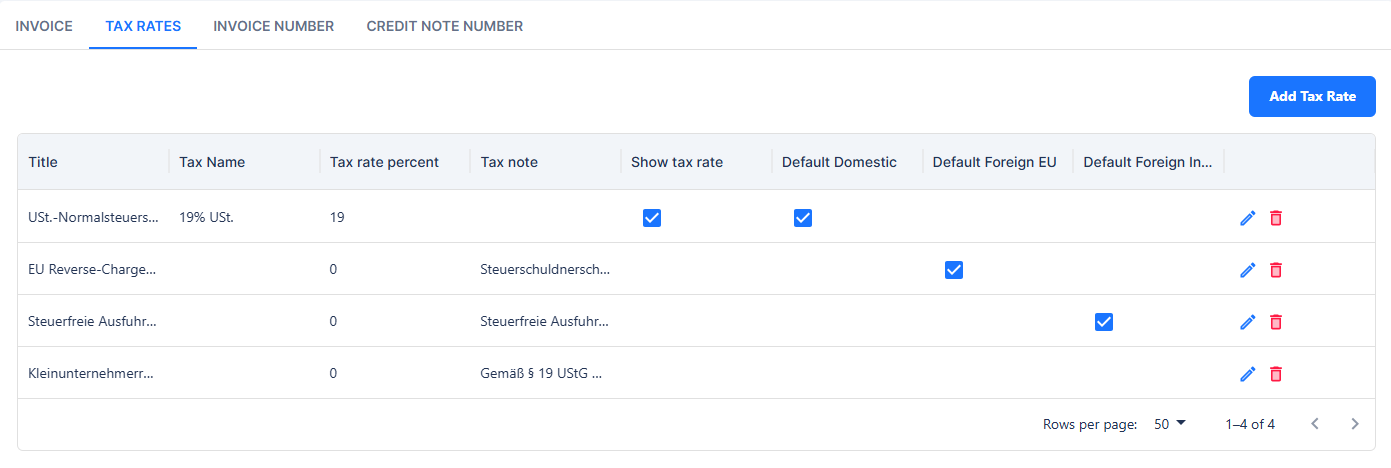
In this section, you define which VAT rates are suggested in the system. Each tax rate includes the following fields:
-
Internal Title: An internal name that is not displayed on the invoice but serves internal classification purposes.
-
Displayed Tax Rate: The name shown on the invoice in the line items (e.g., “19% VAT”).
-
Tax Rate Percentage: The percentage applied when calculating the tax.
-
VAT Note: An optional note, e.g., for cases where VAT is not shown, such as reverse charge procedures.
-
Show Tax Rate on Invoice: A checkbox determining whether the tax rate is displayed on the invoice. For standard domestic VAT, this is typically enabled; for special cases such as reverse charge, it should be disabled.
Additionally, you can define which tax rate should be used by default for domestic customers, EU customers, and non-EU (third-country) customers.
Invoice Number
Here you define the invoice numbering series. You can customize the invoice number format and use placeholders. The page displays a preview of the next number to be assigned. For mid-year changes, you can set the last issued sequence number so that numbering remains continuous.

Use placeholders to customize your number range.
{seq:######}for the sequence number. The number of#defines the number of leading zeros. Use{seq:#}to use no leading zeros.{yyyy}for the four-digit year.{yy}for the two-digit year.{M}for the month, single digit (e.g., 9, 10).{MM}for the month, two digits (e.g., 09, 10).{MMM}for the month, abbreviated (e.g., Oct).{MMMM}for the month, full name (e.g., October).{Q}for the quarter (e.g., 1).Format examples:
R-{yyyy}/Q{Q}-{seq:########}→R-2026/Q4-00001234INV{yy}/{MM}/{seq:#}→INV26/12/1234{yyyy}-{seq:######}→2026-001234
Credit Note Number
Similar to the invoice number, you can define the credit note numbering series here. Credit notes use their own numbering sequence that runs independently from invoices. The format and placeholders work the same way as for invoices.
Document Definition for Offers
The document definition for offers in Surface Solutions allows you to centrally control the layout, content, and default values for all offers. This applies to all offers created within the organization. Through the document definition, you specify which information should appear by default on each offer, which logo and PDF background are used, and which standard positions are automatically inserted.
The settings apply to all offers in the organization that are created based on a calculation. At the same time, certain values in the offer editor can be overwritten per offer — for example, contact details, prices, or visible positions.
Logo and PDF Background
For offers, you can set a specific logo and PDF background. These apply by default to all offers in the organization, including follow-up offers. This ensures that each offer has a consistent appearance.
Contact Information and Standard Details
In this section, you can define key information that should appear on every offer:
-
Contact person and contact details
-
Return address
-
Phone number and email
-
Footer
-
Payment and delivery terms
-
Shipping information
-
General notes
These standard details are automatically included in the offer editor but can be modified or extended for individual offers if needed. This ensures that all offers contain the required information while remaining flexible.
Standard Positions
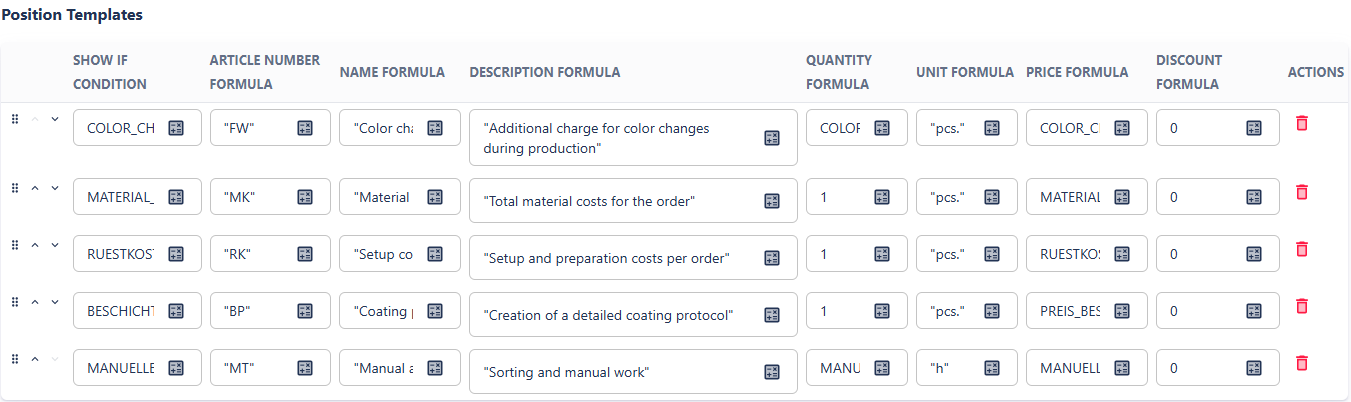
Standard positions are one of the most important features of the document definition for offers. They allow you to automatically print additional positions on each offer that do not originate directly from the calculation. This is especially useful for surcharges or lump sums that apply to the overall offer, such as:
-
Total material costs
-
Number of color changes
-
Setup costs
Note: Setup costs are a common example of a standard position because they are calculated once for the entire offer and cannot be distributed among individual positions.
Features of standard positions:
-
Automatic Integration: All standard positions are automatically included in the offer editor. Users can delete them if they should not be displayed.
-
Access to Summary Template Variables: Standard positions can access only variables from the calculation’s summary template.
-
Price Calculation: The “Price” field can reference a variable directly or define its own formula, which can combine multiple variables (e.g.,
MATERIALCOSTS). -
Visibility: Each standard position can have a visibility condition defined as a formula. If the condition evaluates to
TRUE, the line appears on the offer. Multiple conditions can be combined withAND/OR. -
Flexibility: Standard positions enable the application of costs to the overall result without requiring changes to each position individually. They are ideal for flat-rate costs, additional efforts, or percentage-based surcharges.
Other general costs and surcharges not covered by standard positions are proportionally distributed among the calculation’s existing positions.
Example of Using Standard Positions: Consider a calculation with two positions (Component A and Component B) and a summary template defining a 5% administrative surcharge.
Calculation
Position A 1 pcs € 100,- Position B 1 pcs € 200,- Administrative surcharge 5% € 15,- Total € 315,- If you do not use standard positions, the administrative surcharge is proportionally distributed:
Offer without Standard Position
Position A 1 pcs € 105,- Position B 1 pcs € 210,- Total € 315,- If you add a standard position referencing the variable
SUM_POSITION_PRICESfrom the summary template, you get a offer with a listed surcharge:
'5% Administrative Surcharge' SUM_TOTAL_POSITION_PRICES * 0.05 Offer with Standard Position
Position Quantity Price Position A 1 pcs € 100,- Position B 1 pcs € 200,- 5% Administrative surcharge € 15,- Total € 315,-
Offer Number
The offer number is managed through its own numbering sequence, independent of invoices or credit notes.
-
Number Format: You can define the format of the offer number per organization, e.g., sequential numbers, year, or quarter identifiers.
-
Preview: On the right-hand side of the page, you can see a preview of the next available offer number.

Document Definition for Purchase Orders
The Document Definition for Purchase Orders specifies how purchase orders generated from Surface Solutions are structured in terms of content and appearance. As with other document types (e.g., offers or invoices), all standard information can be maintained centrally, ensuring that each purchase order is consistent and automatically includes the correct sender and address details.
Purchase Order
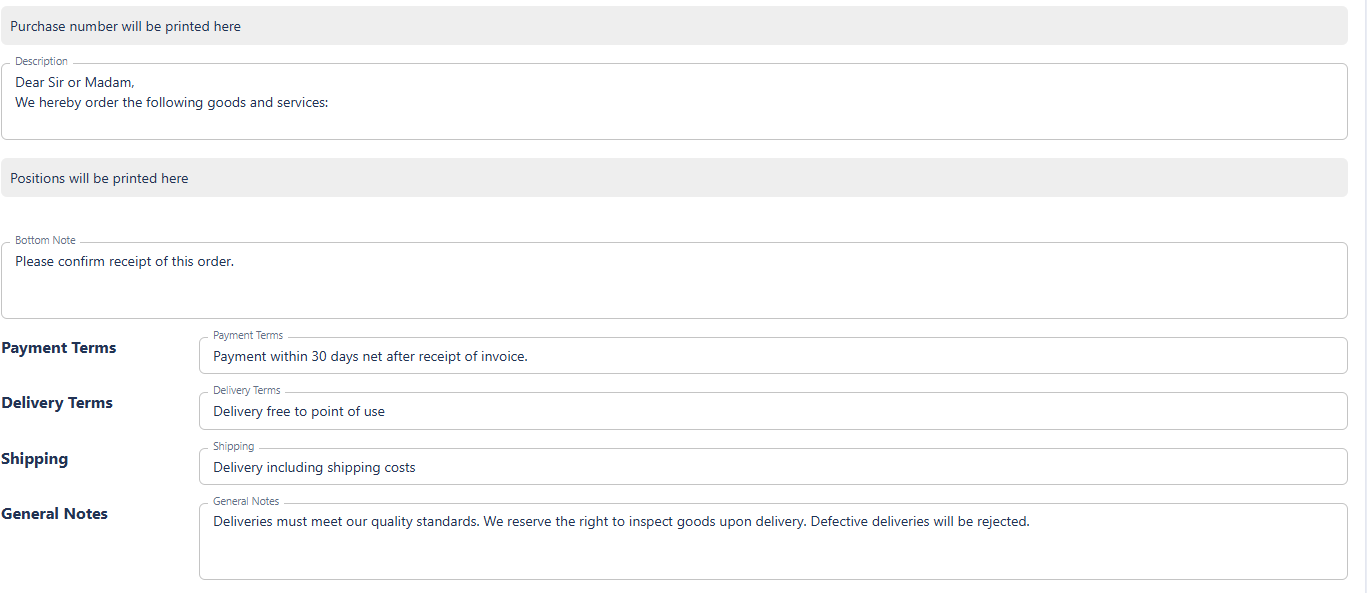
Under the Purchase Order section, the basic details that apply to all of the organization’s purchase orders are defined:
-
Logo and PDF background:
A separate logo and PDF background can be set for purchase orders. This allows purchase orders to differ visually from offers or invoices — for example, when different colors or branding are desired. -
Sender address, billing address, and delivery address:
A key feature of the purchase order definition is the separate management of these three address types.
This enables you to, for example, use a central billing address but specify a project-specific delivery address. These addresses are inserted automatically when creating a purchase order, but can be adjusted in the order form. -
Delivery terms, notes, and footer:
As with other documents, standard texts such as delivery terms, payment conditions, shipping information, or general notes can be stored here. These are automatically included on every purchase order to ensure a consistent external appearance.
Purchase Order Number
Similar to other document types, purchase orders have their own number sequence, which is defined in the Purchase Order Number section.
Here you can:
-
define the format of the purchase order number using placeholders,
-
view a preview of the next number, and
-
seamlessly continue existing numbering sequences if migrating from another system.
The numbering is assigned automatically when the purchase order is finalized, ensuring a unique identifier for every order.
Document Definition for Emails
In the document definition for emails, you can specify how the automatically generated emails from Surface Solutions are structured by default when sending documents such as invoices, offers, or orders. These settings enable consistent and professional communication with your customers without requiring manual adjustments for each sending.
Email Templates for Documents
In the Email section, you can define for each document type (e.g., invoice, offer, order, credit note) which content should be used by default when sending. This particularly includes:
-
Subject of the email, which is pre-filled automatically upon sending.
-
Message text that forms the email content.
-
CC recipients that should automatically be added to each email.
-
Standard attachments that are sent automatically.
This allows, for example, to specify that a certain accompanying message is automatically used for every offer, the accounting department is added as a CC recipient for every invoice, or that an additional information sheet is attached to every order.
Standard Attachments
For each document type, any number of standard attachments can be stored. These are automatically inserted when sending the email.
A typical use case is the automatic sending of the terms and conditions (T&Cs), data sheets, or technical attachments with certain documents.

CC Recipients
CC field, one or more email addresses can be entered, which will automatically be added in copy to every email of the same document type.
This is useful, for example, to ensure that the accounting department or a specific internal contact automatically receives all sent invoices or offers.
All email settings apply organization-wide by default, but can be individually adjusted during actual sending, as Surface Solutions opens the respective local email client.
Email Signature
At the end of the section, the email signature can be defined.
Unlike the other settings, this applies at the user level – meaning each user can store their personal signature here, which is used for their own emails.
This ensures that communication remains both consistent with the organization’s style and individually personalized for the respective sender.